
Gears20180602 - Get APK
You'll be able to download in few seconds.
Publisher Description
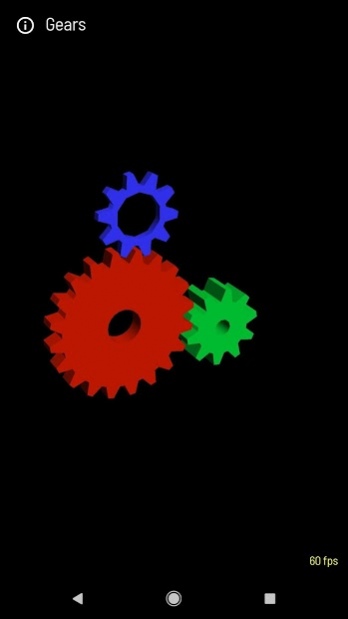
Gears for Android is a heavily modified port of the famous "gears" demo to Android.
The Gears demo is an open source project intended to help developers learn how to create OpenGL ES programs on Android. The Gears demo was originally written by Brian Paul as part of the Mesa3D project. My implementation includes variations for Java/OpenGL ES 1.x, Java/C/OpenGL ES 1.x and Java/C/OpenGL ES 2.0. I have also added several features not found in the original implementation including touch screen support, VBOs and an on-screen FPS counter.
The FPS (frames-per-second) counter is often used as a benchmark metric for graphics programs. On Android the frame rate is limited by v-sync (typically 60 FPS) which is the fastest rate that a display can refresh the screen. Since Gears is capable of rendering much faster than v-sync on most devices it provides limited benchmarking value.
About Gears
The company that develops Gears is Jeff Boody. The latest version released by its developer is 20180602.
To install Gears on your Android device, just click the green Continue To App button above to start the installation process. The app is listed on our website since 2018-06-02 and was downloaded 0 times. We have already checked if the download link is safe, however for your own protection we recommend that you scan the downloaded app with your antivirus. Your antivirus may detect the Gears as malware as malware if the download link to com.jeffboody.GearsES2eclair is broken.
How to install Gears on your Android device:
- Click on the Continue To App button on our website. This will redirect you to Google Play.
- Once the Gears is shown in the Google Play listing of your Android device, you can start its download and installation. Tap on the Install button located below the search bar and to the right of the app icon.
- A pop-up window with the permissions required by Gears will be shown. Click on Accept to continue the process.
- Gears will be downloaded onto your device, displaying a progress. Once the download completes, the installation will start and you'll get a notification after the installation is finished.
Program Details
System requirements
Download information
Pricing
Version History
version 20180602
posted on 2018-06-02
6/2/2018
. Update for Android Developer Studio
. Improve about page
2/27/2015
. Fixed IllegalArgumentException for multitouch
9/2/2014
. Fixed Java signing issue
8/23/2014
. Fixed memory corruption
11/13/2013
. Added quaternions for natural rotations and rolling
. Miscelaneous cleanup
. Added ports for SDL and LOAX environments
version 7
posted on 2015-02-27
20150227,* Fixed IllegalArgumentException for multitouch,20140902,* Fixed Java signing issue,20140823,* Fixed memory corruption,20131113,* Added quaternions for natural rotations and rolling,* Miscelaneous cleanup,* Added ports for SDL and LOAX environments,20110501,* For Android 2.0 (eclair),* Fix lighting bug observed when zooming,* Replaced simclist library,* Compile in thumb mode,* Simplified a3d GL wrapper,* Updated Gears icon (again),* Uploaded source to github
version 3
posted on 2011-05-01
Several fixes and updates
Disclaimer
External Download
We do not host Gears on our servers. We did not scan it for viruses, adware, spyware or other type of malware. This app is hosted by Galad and passed their terms and conditions to be listed there. We recommend caution when installing it.
The APK Download link for Gears is provided to you by apps112.com without any warranties, representations or guarantees of any kind, so access it at your own risk.
If you have questions regarding this particular app contact the publisher directly. For questions about the functionalities of apps112.com contact us.
